Area Charts
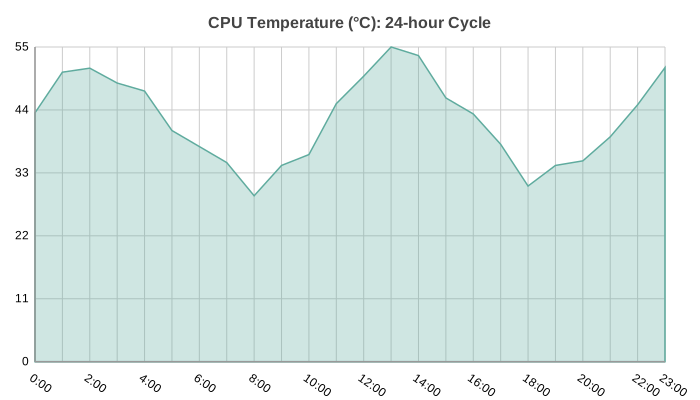
Area chart with filled regions under the line. Shows magnitude of change over time and is ideal for comparing multiple series stacked or overlaid.
Basic Usage
Single series area chart:
from charted.charts import AreaChart

chart = AreaChart(
    data=[120, -80, 150, -90, 170],
    labels=["Jan", "Feb", "Mar", "Apr", "May"],
    title="Monthly Trend"
)
chart.save("area.svg")
Multi-Series
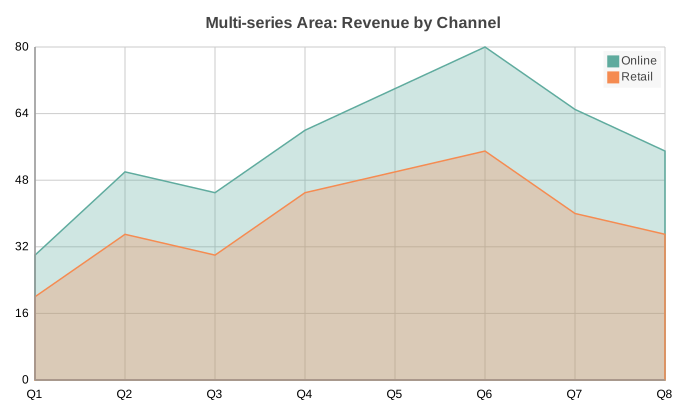
Overlapping area fills for comparing multiple data series:
chart = AreaChart(
    data=[
        [10, 20, -30, 40],
        [-15, 25, -10, 35],
    ],
    labels=["Q1", "Q2", "Q3", "Q4"],
    series_names=["Revenue", "Expenses"],
    title="Revenue vs Expenses",
)
Customizing Fill Opacity
Adjust fill opacity for better visibility of overlaid areas:
chart = AreaChart(
    data=[10, -5, 8, 15, -3],
    labels=["A", "B", "C", "D", "E"],
    fill_opacity=0.6,  # Default is 0.1; higher = more opaque
)
Curve interpolation
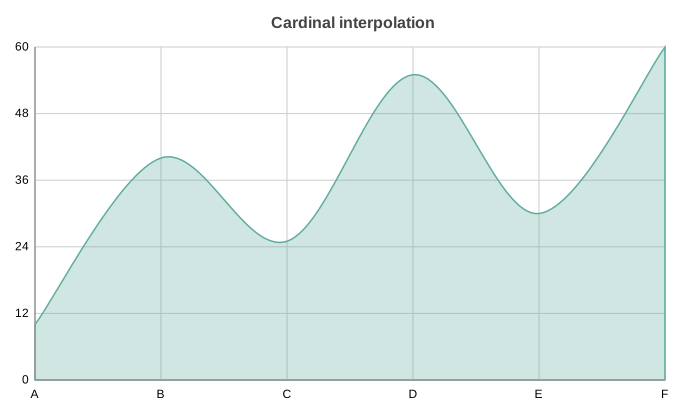
Area charts accept the same curve option as line charts:
"linear" (default), "step", "basis", and "cardinal".
Cardinal smooths the top edge of the fill into a spline:
chart = AreaChart(
    title="Cardinal interpolation",
    data=[10, 40, 25, 55, 30, 60],
    labels=["A", "B", "C", "D", "E", "F"],
    curve="cardinal",
)
chart.save("area_curve_cardinal.svg")
Custom Colors
Override the default color palette:
chart = AreaChart(
    data=[100, -20, 50],
    labels=["A", "B", "C"],
    theme={
        "colors": ["#2ECC71", "#3498DB"]
    }
)
API Reference
- class charted.charts.area.AreaChart(*args, **kwargs)[source]
Bases:
ChartArea chart showing filled regions under lines.
- Parameters:
data (Vector | Vector2D) – Single series (list of values) or multi-series (list of lists).
x_data (Vector | Vector2D | None) – Optional x-axis values.
labels (Labels | None) – Optional x-axis labels.
width (float) – Chart dimensions in pixels.
height (float) – Chart dimensions in pixels.
fill_opacity (float) – Opacity of the area fill (default 0.3).
title (str | None) – Optional chart title.
theme (Theme | None) – Optional theme configuration.
series_names (list[str] | None) – Names for each series (shown in legend).
series_styles (list[SeriesStyleConfig] | None) – Per-series style overrides.
annotations (list[_Annotation] | None) – Optional list of annotation objects (LineAnnotation, BoxAnnotation, LabelAnnotation) drawn in the plot area.
subtitle (str | None)
subtitle_leading (float)
curve (str)
stacked (bool)
x_scale (object | None)
y_scale (object | None)
x_label (str | None)
y_label (str | None)
reference_lines (list[ReferenceLineDict] | None)
domain_padding (float | None)
Example
>>> chart = AreaChart(
...     data=[[10, 20, 30], [15, 25, 35]],
...     labels=['A', 'B', 'C'],
... )
Parameters:
data: Single list (one series) or list of lists (multi-series)labels: X-axis categoriesx_data: Optional x-axis values for XY modeseries_names: Series names for legendwidth: Width in pixels (default 800)height: Height in pixels (default 600)fill_opacity: Fill opacity 0-1 (default 0.1)theme: Theme string or dicttitle: Chart title
Example:
from charted import AreaChart

chart = AreaChart(
    data=[10, -5, -8, 3, 5],
    labels=["A", "B", "C", "D", "E"],
    title="Trend",
)
chart.save("area.svg")
- property representation: G
Render area chart series as filled paths.