Bar Charts
Horizontal bar chart with support for single/multi-series, stacked and side-by-side layouts. Handles negative values with proper zero baseline.
Basic Usage
Single series bars:
from charted.charts import BarChart

chart = BarChart(
    data=[120, 180, 210, 150],
    labels=["Q1", "Q2", "Q3", "Q4"],
    title="Sales by Quarter"
)
chart.save("bars.svg")
With Negative Values
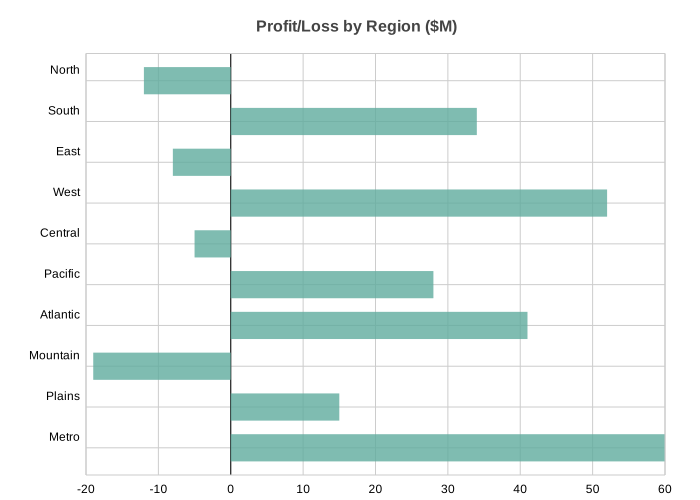
Bar charts handle negative values, extending left from the zero baseline:
chart = BarChart(
    title="Profit/Loss by Region ($M)",
    data=[-12, 34, -8, 52, -5, 28, 41, -19, 15, 60],
    labels=["North", "South", "East", "West", "Central", "Pacific", "Atlantic", "Mountain", "Plains", "Metro"],
    width=700,
    height=500,
)
Multi-Series Side-by-Side
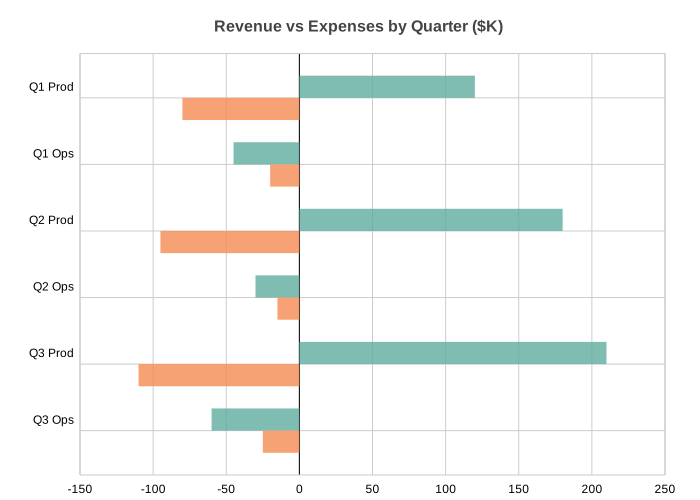
Multiple bars per category for comparison:
chart = BarChart(
    title="Revenue vs Expenses by Quarter ($K)",
    data=[
        [120, -45, 180, -30, 210, -60],   # Revenue
        [-80, -20, -95, -15, -110, -25],  # Expenses
    ],
    labels=["Q1 Prod", "Q1 Ops", "Q2 Prod", "Q2 Ops", "Q3 Prod", "Q3 Ops"],
    series_names=["Revenue", "Expenses"],
    width=700,
    height=500,
)
Stacked Bars
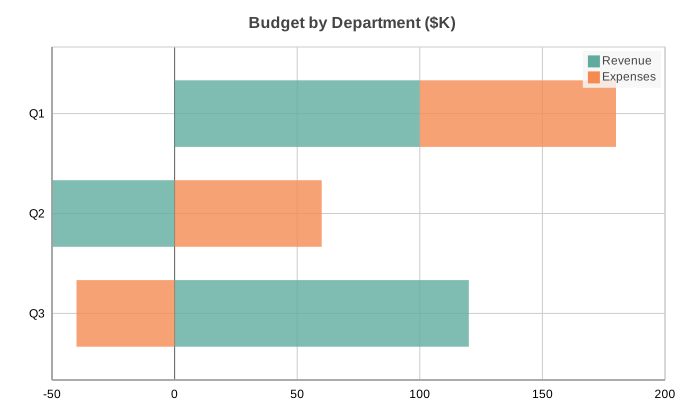
Stack bars horizontally to show cumulative values:
chart = BarChart(
    title="Budget by Department ($K)",
    data=[
        [100, -50, 120],    # Revenue
        [80, 60, -40],      # Expenses
    ],
    labels=["Q1", "Q2", "Q3"],
    series_names=["Revenue", "Expenses"],
    x_stacked=True,
    width=700,
    height=400,
)
Configuration Options
Bar spacing:
# Adjust gap between bars (0-1, default 0.5)
chart = BarChart(
    data=[1, 2, 3],
    labels=["a", "b", "c"],
    bar_gap=0.3  # Tighter bars
)
Custom theme:
chart = BarChart(
    data=[120, 180, 210],
    labels=["Q1", "Q2", "Q3"],
    theme="dark",  # or "light", "high-contrast"
)

 # Custom theme with specific colors
 chart = BarChart(
     data=[120, 180, 210],
     labels=["Q1", "Q2", "Q3"],
     theme={
         "colors": ["#FF6B6B", "#4ECDC4", "#45B7D1"],
     },
     bar_gap=0.2
 )
API Reference
- class charted.charts.bar.BarChart(*args, **kwargs)[source]
Bases:
ChartHorizontal bar chart for comparing categorical data.
Displays data as horizontal bars where the length of each bar represents the value. Supports single and multi-series data, with optional stacking and side-by-side layouts.
- Parameters:
data (Vector | Vector2D) – Single series (list of values) or multi-series (list of lists)
labels (Labels | None) – Category labels for the y-axis
bar_gap (float | None) – Gap between bars as ratio of bar height (default from config)
width (float) – Chart dimensions in pixels
height (float) – Chart dimensions in pixels
zero_index (bool) – Whether to include zero on the x-axis
title (str | None) – Optional chart title
theme (Theme | None) – Optional theme configuration
series_names (list[str] | None) – Names for each series (shown in legend)
series_styles (list[SeriesStyleConfig] | None) – Per-series style overrides
x_stacked (bool) – If True, stack bars horizontally instead of side-by-side
category_label_max_width (float | None) – Max pixel width for a category label before it wraps onto multiple lines. None (default) keeps the full label on a single line and grows the left gutter to fit it. Set this to wrap long names (no truncation) and keep the plot area wide.
subtitle (str | None)
subtitle_leading (float)
x_label (str | None)
y_label (str | None)
annotations (list[_Annotation] | None)
reference_lines (list[ReferenceLineDict] | None)
legend (str)
domain_padding (float | None)
Example
>>> from charted import BarChart
>>> chart = BarChart(data=[120, 180, 210], labels=['Q1', 'Q2', 'Q3'])
>>> chart.save('sales.svg')
Parameters:
data: Single list for one series, or list of lists for multi-serieslabels: Y-axis category labelsseries_names: Names for each data series (shown in legend)x_stacked: If True, stack bars horizontallybar_gap: Gap between bars as ratio (0-1, default 0.5)width: Chart width in pixels (default 800)height: Chart height in pixels (default 600)theme: Theme name string or theme dictionarytitle: Chart title textsubtitle: Optional subtitle text
Example:
from charted import BarChart chart = BarChart( data=[-12, 34, -8, 52], labels=["North", "South", "East", "West"], title="Regional Performance", theme="dark" ) chart.save("bar.svg") print(chart.to_markdown()) # 
- property representation: G
Subclass must implement this.