Heatmaps
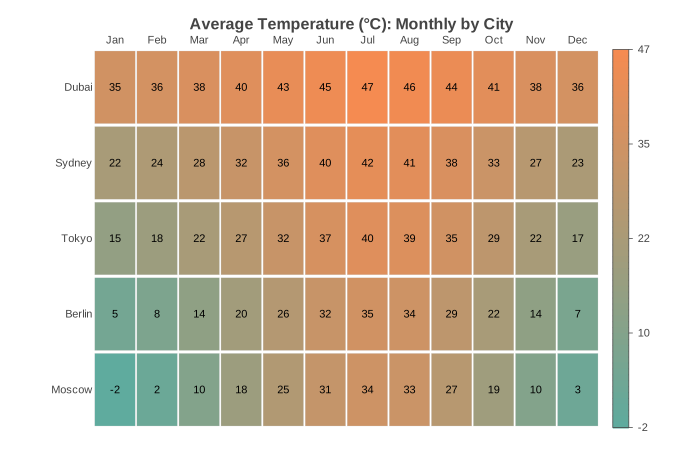
Heatmap chart for visualizing matrix data with a color gradient. Each cell in the grid is colored according to its value, with an optional legend scale on the right side. Supports row and column labels and per-cell value annotations.
Basic Usage
Simple numeric matrix visualization:
from charted.charts import HeatmapChart

chart = HeatmapChart(
    data=[
        [1, 2, 3],
        [4, 5, 6],
        [7, 8, 9],
    ],
    x_labels=["A", "B", "C"],
    y_labels=["Row 1", "Row 2", "Row 3"],
    title="Matrix Values",
)
chart.save("heatmap.svg")
Correlation Matrix
Common use case for correlation matrices:
chart = HeatmapChart(
    data=[
        [1.0, 0.85, -0.3],
        [0.85, 1.0, -0.2],
        [-0.3, -0.2, 1.0],
    ],
    x_labels=["X", "Y", "Z"],
    y_labels=["X", "Y", "Z"],
    title="Correlation Matrix",
    value_format=".2f",
)
Customizing Colors and Display
Control the color scale range and display options:
chart = HeatmapChart(
    data=[
        [10, 50, 90],
        [30, 60, 85],
        [20, 70, 95],
    ],
    x_labels=["A", "B", "C"],
    y_labels=["Row 1", "Row 2", "Row 3"],
    low_color="#1a6b8f",
    high_color="#f7a55c",
    show_values=True,
    value_format=".0f",
    cell_gap=0.05,
)
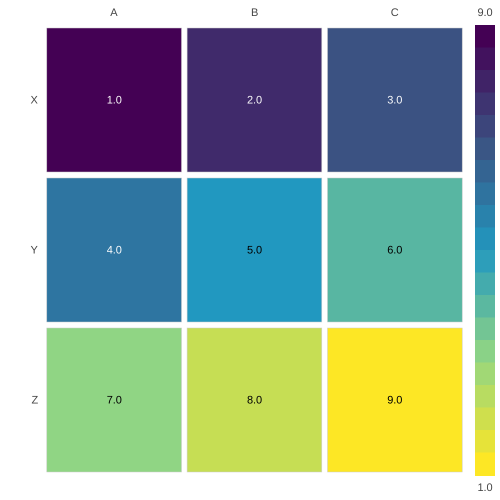
Continuous color scale
The default two-color low_color / high_color gradient interpolates
between just two endpoints. For a multi-stop gradient, pass color_scale.
It accepts a named palette such as "viridis", a list of hex stops, or a
ColorScale. Each cell is colored along the
gradient by its value, and color_scale overrides low_color and
high_color.
from charted.charts import HeatmapChart

chart = HeatmapChart(
    data=[
        [1, 2, 3],
        [4, 5, 6],
        [7, 8, 9],
    ],
    x_labels=["A", "B", "C"],
    y_labels=["Row 1", "Row 2", "Row 3"],
    title="Continuous Color Scale",
    color_scale="viridis",
)
chart.save("heatmap.svg")
You can also pass an explicit list of hex stops or a ColorScale:
from charted.themes.core import ColorScale

chart = HeatmapChart(
    data=[[1, 2, 3], [4, 5, 6], [7, 8, 9]],
    color_scale=ColorScale(palette=["#440154", "#21918c", "#fde725"]),
)
API Reference
- class charted.charts.heatmap.HeatmapChart(*args, **kwargs)[source]
Bases:
ChartHeatmap chart for visualizing matrix data as colored cells.
Renders a 2D grid where each cell’s color represents its value. Supports row and column labels, value annotations inside cells, and automatic color scaling based on data range.
- Parameters:
data (list[list[float]]) – 2D matrix (list of lists) where each inner list is a row.
x_labels (Labels | None) – Labels for each column (optional, auto-generated if omitted).
y_labels (Labels | None) – Labels for each row (optional, auto-generated if omitted).
width (float) – Chart dimensions in pixels.
height (float) – Chart dimensions in pixels.
title (str | None) – Optional chart title.
theme (Theme | None) – Optional theme configuration.
series_names (list[str] | None) – Names for each series (shown in legend).
series_styles (list[SeriesStyleConfig] | None) – Per-series style overrides.
low_color (str | None) – Color for the lowest value in the data. Defaults to None, which derives the low endpoint from the first theme palette colour.
high_color (str | None) – Color for the highest value in the data. Defaults to None, which derives the high endpoint from the last theme palette colour.
color_scale (ColorScale | str | list[str] | None) – Optional continuous color scale. Pass a ColorScale, a named palette string (e.g. ‘viridis’), or a list of hex stops to color cells along a multi-stop gradient. Overrides low_color and high_color. Defaults to None (two-color low/high behavior).
show_values (bool) – If True, display the numeric value in each cell (default True).
value_format (str) – Format string for displayed values (default ‘.1f’).
cell_gap (float) – Gap between cells as fraction of cell size (default 0.04).
label_font_size (int) – Font size for row/column labels (default 11).
cell_border_width (float) – Stroke width of the thin border around each cell, in pixels (default 0.25).
colorbar_ticks (int) – Number of evenly spaced tick labels on the colorbar, including the min and max endpoints (default 5, minimum 2).
colorbar_title (str | None) – Optional title rendered vertically beside the colorbar, e.g. a unit or measure name. Defaults to None (no title).
colorbar_width (float) – Width of the gradient strip in pixels (default 16).
Example
>>> from charted import HeatmapChart
>>> chart = HeatmapChart(
...     data=[[1, 2, 3], [4, 5, 6], [7, 8, 9]],
...     x_labels=['A', 'B', 'C'],
...     y_labels=['X', 'Y', 'Z'],
... )
>>> chart.save('matrix.svg')
Parameters:
data: 2D matrix (list of list of numbers)x_labels: Column labels (auto-generated if omitted)y_labels: Row labels (auto-generated if omitted)width: Chart px (default 800)height: Chart px (default 600)low_color: Color for minimum value (default “#1a6b8f”)high_color: Color for maximum value (default “#f7a55c”)color_scale: Continuous multi-stop gradient: a named palette (e.g. “viridis”), a list of hex stops, or aColorScale. Overrideslow_color/high_color(default None)show_values: Display values in cells (default True)value_format: Format string for cell values (default “.1f”)cell_gap: Gap between cells as fraction (default 0.04)label_font_size: Label font size px (default 11)theme: Theme or theme dicttitle: Chart title
Example:
from charted import HeatmapChart

chart = HeatmapChart(
    data=[[1, 2], [3, 4]],
    x_labels=["A", "B"],
    y_labels=["X", "Y"],
    title="Sample Heatmap",
)
chart.save("heatmap.svg")
- render_axes = False
- property representation: G
Subclass must implement this.