Bubble Charts
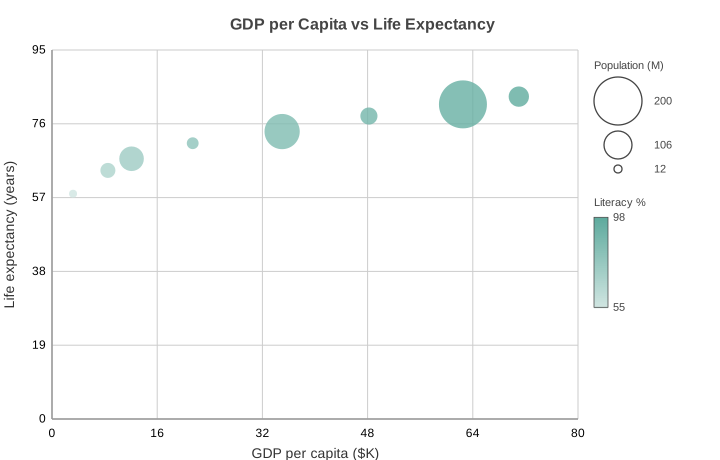
Scatter plot where each marker’s radius encodes a third data dimension. Useful when you want to show three variables at once: x, y, and a magnitude.
Basic Usage
A bubble chart takes x_data, y_data, and a matching list of sizes:
from charted.charts import BubbleChart

chart = BubbleChart(
    x_data=[1, 2, 3, 4, 5],
    y_data=[10, 25, 15, 30, 20],
    sizes=[5, 30, 12, 45, 18],
    title="Sales by Region",
)
chart.save("bubble.svg")
The values in sizes are mapped linearly onto the [min_radius, max_radius] range, so the largest value becomes the largest bubble.
Radius Range
Control the smallest and largest rendered marker radius:
chart = BubbleChart(
    x_data=[1, 2, 3],
    y_data=[10, 20, 15],
    sizes=[5, 30, 12],
    min_radius=6.0,
    max_radius=40.0,
)
Multi-Series
Pass nested lists for x_data and y_data to draw more than one series:
chart = BubbleChart(
    x_data=[[1, 2, 3], [1, 2, 3]],
    y_data=[[10, 20, 15], [5, 12, 9]],
    sizes=[5, 30, 12],
    series_names=["Group A", "Group B"],
)
API Reference
- class charted.charts.bubble.BubbleChart(*args, **kwargs)[source]
Bases:
ScatterChartBubble chart: a scatter plot where marker radius encodes a third value.
Each point is drawn as a circle at its (x, y) position, exactly like a scatter plot, but the circle radius is scaled from a third data dimension (
sizes) into a configurable[min_radius, max_radius]range.Sizes map linearly to the circle radius, not its area. Because a circle’s area grows with the square of its radius, large values look more than proportionally bigger than their value warrants. This is intentional; if you want perceived size to track value, pre-transform your data with
sqrtbefore passing it assizes.For multi-series charts,
sizesapplies per point index across every series (sizes[i]sets the radius of pointiin all series), and its length is validated against the point count of the first series.- Parameters:
x_data (Vector | Vector2D) – X-coordinates for each point.
y_data (Vector | Vector2D) – Y-coordinates for each point.
sizes (Vector) – Third dimension; one non-negative value per point. Mapped linearly onto
[min_radius, max_radius](radius, not area).min_radius (float) – Smallest rendered marker radius in pixels.
max_radius (float) – Largest rendered marker radius in pixels.
size_legend (bool | str) – When truthy, draws a size-scale legend in a reserved right-hand band: a few representative bubbles keyed to their
sizesvalue so readers can decode the third dimension. AcceptsTrue(or"right") to show it,False(default) or"none"to hide it.size_legend_title (str | None) – Optional heading shown above the size legend.
hue (Vector | None) – Optional fourth dimension; one value per point. When given, each bubble’s fill is interpolated across
hue_colorsby its hue value, and a hue colorbar is added beneath the size legend. Applies per point index across every series (likesizes).hue_colors (tuple[str, str] | None) –
(low, high)hex colours for the hue gradient. When omitted, a light-to-dark ramp of the first palette colour is used.hue_title (str | None) – Optional heading shown beside the hue colorbar.
width (float) – Chart dimensions in pixels.
height (float) – Chart dimensions in pixels.
title (str | None) – Optional chart title.
theme (Theme | None) – Optional theme configuration.
series_names (list[str] | None) – Names for each series (shown in legend).
series_styles (list[SeriesStyleConfig] | None)
x_label (str | None)
y_label (str | None)
legend (str)
domain_padding (float | None)
Example
>>> from charted import BubbleChart
>>> chart = BubbleChart(
...     x_data=[1, 2, 3],
...     y_data=[10, 20, 15],
...     sizes=[5, 30, 12],
... )
>>> chart.save('bubble.svg')
Parameters:
x_data: X coordinates for each pointy_data: Y coordinates for each pointsizes: Third dimension; one non-negative value per pointmin_radius: Smallest rendered marker radius in pixels (default 4.0)max_radius: Largest rendered marker radius in pixels (default 24.0)width: Chart width in pixelsheight: Chart height in pixelstheme: Theme name string or theme dictionarytitle: Chart title textseries_names: Names for each series (shown in legend)
Example:
from charted import BubbleChart chart = BubbleChart( x_data=[1, 2, 3, 4, 5], y_data=[10, 25, 15, 30, 20], sizes=[5, 30, 12, 45, 18], title="Sales by Region", theme="dark", # or "light", "high-contrast" ) chart.save("bubble.svg") print(chart.to_markdown()) # 
- property representation: G
Subclass must implement this.