Radar Charts
Radar (or spider) charts display multivariate data on a two-dimensional chart with axes radiating from a central point. Each axis represents a variable, with concentric grid lines showing scale. Supports multi-series comparison.
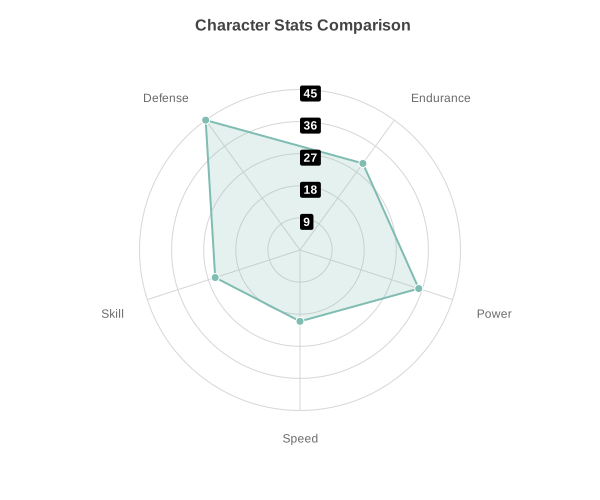
Basic Usage
Single series radar chart:
from charted.charts import RadarChart

chart = RadarChart(
    data=[85, 90, 75, 88, 92],
    labels=["Speed", "Strength", "Defense", "Technique", "Stamina"],
    title="Player Stats"
)
chart.save("radar.svg")
Multi-Series Comparison
Compare multiple series on the same radar chart:
chart = RadarChart(
    title="Player Skill Comparison",
    data=[
        [85, 90, 75, 88, 92],  # Player A
        [70, 85, 90, 75, 80],  # Player B
    ],
    labels=["Speed", "Strength", "Defense", "Technique", "Stamina"],
    series_names=["Player A", "Player B"],
    width=600,
    height=500,
)
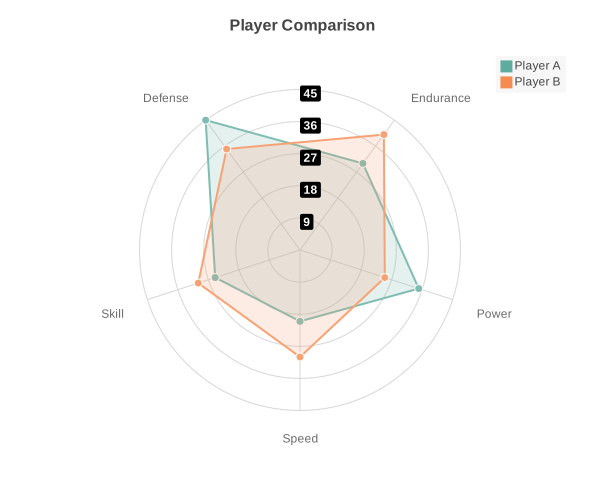
Custom Grid Levels
Control the number of concentric grid rings:
chart = RadarChart(
    data=[20, 35, 30, 45, 25],
    labels=["Speed", "Power", "Endurance", "Defense", "Skill"],
    grid_levels=8,  # More grid rings
)
Customizing Radius
Adjust the chart radius relative to the canvas size:
chart = RadarChart(
    data=[20, 35, 30, 45, 25],
    labels=["Speed", "Power", "Endurance", "Defense", "Skill"],
    radius=0.35,  # Smaller chart area (default 0.45)
)
Hiding Axis Labels
Remove axis labels for a cleaner look:
chart = RadarChart(
    data=[20, 35, 30, 45, 25],
    labels=["Speed", "Power", "Endurance", "Defense", "Skill"],
    show_axis_labels=False,
)
Custom Colors
Override the default color palette:
chart = RadarChart(
    data=[85, 90, 75, 88, 92],
    labels=["Speed", "Strength", "Defense", "Technique", "Stamina"],
    theme={
        "colors": ["#FF6B6B", "#4ECDC4"]
    }
)
Or use a built-in theme:
chart = RadarChart(
    data=[85, 90, 75, 88, 92],
    labels=["Speed", "Strength", "Defense", "Technique", "Stamina"],
    theme="dark"
)
Configuration Options
Complete radar chart configuration:
chart = RadarChart(
    data=[
        [85, 90, 75, 88, 92],
        [70, 85, 90, 75, 80],
    ],
    labels=["Speed", "Strength", "Defense", "Technique", "Stamina"],
    series_names=["Player A", "Player B"],
    title="Player Skill Comparison",
    width=600,
    height=500,
    radius=0.45,           # Chart radius as ratio (default 0.45)
    grid_levels=5,         # Number of concentric grid circles
    show_axis_labels=True, # Display axis labels
    label_offset=20,       # Distance from grid edge for labels
)
API Reference
- class charted.charts.radar.RadarChart(*args, **kwargs)[source]
Bases:
ChartRadar chart (spider chart) for displaying multivariate data.
Renders data on a two-dimensional chart in the form of a polygon with vertices on axes radiating from a central point. Each axis represents a variable, with concentric grid lines showing scale. Supports multi-series data with customizable axis count and labels.
- Parameters:
data (Vector | Vector2D) – Single series (list of values) or multi-series (list of lists)
labels (Labels) – Labels for each axis (one per data point in series)
width (float) – Chart dimensions in pixels
height (float) – Chart dimensions in pixels
title (str | None) – Optional chart title
theme (Theme | None) – Optional theme configuration
series_names (list[str] | None) – Names for each series (shown in legend)
series_styles (list[SeriesStyleConfig] | None) – Per-series style overrides (stroke, fill, etc.)
radius (float) – Chart radius as ratio of min(width, height) (default 0.75)
axis_count (int | None) – Number of axes (defaults to len(labels))
grid_levels (int) – Number of concentric grid circles (default 5)
show_axis_labels (bool) – Whether to display axis labels (default True)
label_offset (float) – Distance from grid edge for labels (default 20)
show_radial_labels (bool) – Whether to label radial rings with their numeric scale value (default True)
Example
>>> from charted import RadarChart
>>> # Basic radar chart
>>> chart = RadarChart(
...     data=[20, 35, 30, 45, 25],
...     labels=['Speed', 'Power', 'Endurance', 'Defense', 'Skill']
... )
>>> chart.save('character_stats.svg')
>>>
>>> # Multi-series comparison
>>> chart = RadarChart(
...     data=[[20, 35, 30, 45, 25], [30, 25, 40, 35, 30]],
...     labels=['Speed', 'Power', 'Endurance', 'Defense', 'Skill'],
...     series_names=['Player A', 'Player B']
... )
Parameters:
data: Single list of values or list of lists for multi-serieslabels: Labels for each axis (one per data point in series)series_names: Names for each data series (shown in legend)radius: Chart radius as ratio of min(width, height) (default 0.45)grid_levels: Number of concentric grid circles (default 5)show_axis_labels: Whether to display axis labels (default True)label_offset: Distance from grid edge for labels (default 20)width: Chart width in pixels (default 500)height: Chart height in pixels (default 500)theme: Theme name string or theme dictionarytitle: Chart title textsubtitle: Optional subtitle text
Example:
from charted import RadarChart chart = RadarChart( data=[85, 90, 75, 88, 92], labels=["Speed", "Strength", "Defense", "Technique", "Stamina"], title="Player Stats" ) chart.save("radar.svg") print(chart.to_markdown()) # 
- render_axes = False
- __init__(data, labels, width=500, height=500, title=None, theme=None, series_names=None, series_styles=None, radius=0.75, axis_count=None, grid_levels=5, show_axis_labels=True, label_offset=20, show_radial_labels=True)[source]
Initialize radar chart.
- Parameters:
data (list[float] | list[list[float]]) – Single series (list of values) or multi-series (list of lists)
labels (list[str]) – Labels for each axis (one per data point in series)
width (float) – Chart dimensions in pixels
height (float) – Chart dimensions in pixels
title (str | None) – Optional chart title
theme (Theme | None) – Optional theme configuration
series_names (list[str] | None) – Names for each series (shown in legend)
series_styles (list[SeriesStyleConfig] | None) – Per-series style overrides (stroke, fill, etc.)
radius (float) – Chart radius as ratio of min(width, height) (default 0.75)
axis_count (int | None) – Number of axes (defaults to len(labels))
grid_levels (int) – Number of concentric grid circles (default 5)
show_axis_labels (bool) – Whether to display axis labels (default True)
label_offset (float) – Distance from grid edge for labels (default 20)
show_radial_labels (bool)
- property representation: G
Generate radar chart SVG elements using RadarRenderer.