Gantt Charts
Gantt chart for project timeline visualization. Displays tasks as horizontal bars along a timeline, with optional dependency arrows between related tasks.
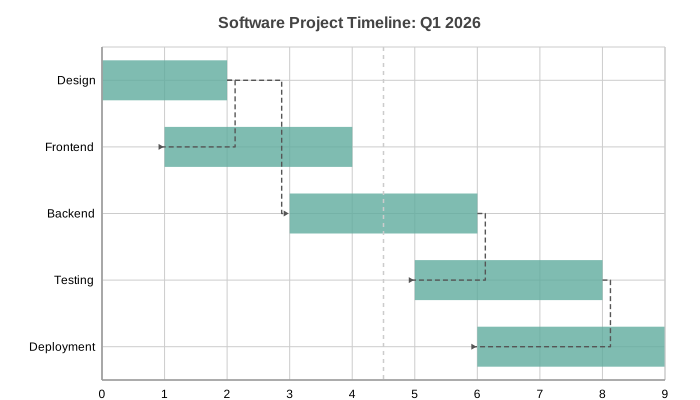
Basic Usage
Simple task timeline:
from charted.charts import GanttChart

chart = GanttChart(
    data=[(1, 5), (3, 7), (6, 9)],
    labels=["Design", "Development", "Testing"],
    title="Project Timeline",
)
chart.save("gantt.svg")
Multi-Series Tasks
Grouped tasks with dependency arrows:
chart = GanttChart(
    data=[
        [(0, 3), (4, 7)],
        [(2, 6), (6, 10)],
    ],
    labels=["Design", "Dev", "QA", "Deploy"],
    title="Multi-Phase Project",
)
Dependency Arrows
Draw arrows between dependent tasks:
chart = GanttChart(
    data=[(1, 4), (3, 6), (5, 8)],
    labels=["Design", "Development", "Testing"],
    dependencies=[(0, 1), (1, 2)],
    title="Task Dependencies",
)
Customizing Appearance
Control bar height and show a today marker:
chart = GanttChart(
    data=[(1, 3), (3, 5), (5, 7)],
    labels=["Task A", "Task B", "Task C"],
    bar_height_ratio=0.8,
    show_today_line=True,
    x_position=4,
)
API Reference
- class charted.charts.gantt.GanttChart(*args, **kwargs)[source]
Bases:
ChartGantt chart for scheduling and project timeline visualization.
Displays tasks as horizontal bars along a timeline. Each task has a start and end value, and bars are drawn proportionally along the x-axis. Supports multi-series (grouped tasks) and optional dependency arrows.
- Parameters:
data (list[GanttTask] | list[GanttSeries]) – Single series of (start, end) tuples, or multi-series list of lists.
labels (Labels | None) – Task names displayed on the y-axis (one per task in single series, or one per group in multi-series).
width (float) – Chart dimensions in pixels.
height (float) – Chart dimensions in pixels.
title (str | None) – Optional chart title.
theme (Theme | None) – Optional theme configuration.
series_names (list[str] | None) – Names for each series (shown in legend).
series_styles (list[SeriesStyleConfig] | None) – Per-series style overrides.
dependencies (list[tuple[int, int]] | None) – List of (from_task, to_task) tuples for dependency arrows. Task indices are 0-based within the flattened task list.
bar_height_ratio (float) – Bar height as fraction of row height (default 0.6).
show_today_line (bool) – If True, draw a dashed vertical line at a given x_position value (requires x_position to be set).
x_position (TimeValue | None) – Value (number or date) for the today/marker line.
show_durations (bool) – If True, label each bar with its duration (default False). For numeric data the label is
end - start; for date data it is the number of whole days. Aduration_formattercan override the rendered text.duration_formatter (DurationFormatter | None) – Optional
callable(start, end) -> strused to format each duration label.
Dates:
start/endmay bedate,datetimeor ISO-8601 strings as well as plain numbers. When any value is date-like the x-axis automatically switches to a calendar-aware time scale; otherwise the historical integer axis is used unchanged.Example
>>> from charted import GanttChart
>>> chart = GanttChart(
...     data=[("2024-01-01", "2024-02-15"), ("2024-02-01", "2024-04-01")],
...     labels=["Design", "Development"],
...     show_durations=True,
... )
>>> chart.save('project.svg')
Parameters:
data: List of (start, end) tuples for task barslabels: Task names on the y-axiswidth: Chart px px (default 800)height: Chart pixel px (default 600)dependencies: List of (from, to) task index tuples for arrowsbar_height_ratio: Bar height as fraction of row (default 0.6)show_today_line: Draw dashed vertical line at x_positionx_position: X value for the “today” linetheme: Theme dictionary or stringtitle: Chart title
Example:
from charted import GanttChart

chart = GanttChart(
    data=[(1, 3), (4, 6), (7, 9)],
    labels=["Design", "Build", "Test"],
    title="Project Schedule",
)
chart.save("gantt.svg")
- property representation: G
Subclass must implement this.