Scatter Charts
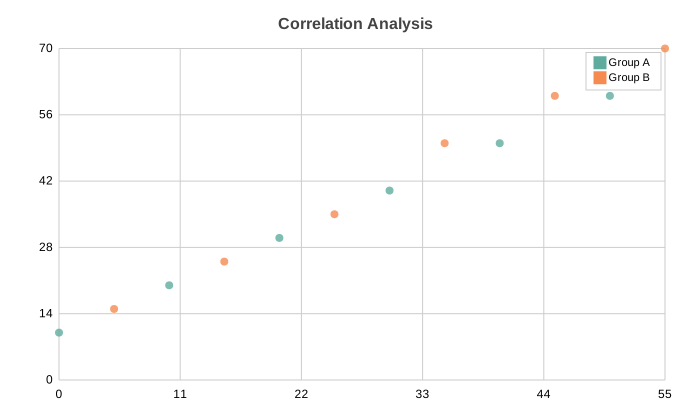
Scatter plot with support for multi-series and custom marker shapes. Perfect for showing relationships between two variables.
Basic Usage
Single series scatter:
from charted.charts import ScatterChart

chart = ScatterChart(
    data=[[1, 2], [2, 3], [3, 5], [4, 4], [5, 7]],
    labels=["Data Points"],
    title="Correlation Example"
)
chart.save("scatter.svg")
Multi-Series
Multiple scatter series for comparison:
chart = ScatterChart(
    data=[
        [[1, 2], [2, 3], [3, 5], [4, 4]],      # Series A
        [[1, 1], [2, 2], [3, 4], [4, 6]],      # Series B
    ],
    labels=["Series A", "Series B"],
    title="Comparing Distributions",
    width=700,
    height=500,
)
Custom X/Y Data
Alternative format with explicit x_data and y_data:
chart = ScatterChart(
    x_data=[1, 2, 3, 4, 5],
    y_data=[2, 4, 5, 4, 6],
    labels=["Product Sales"],
    title="Price vs Sales"
)
Marker Customization
Change marker shape and size:
# Circle markers (default)
chart = ScatterChart(
    x_data=[1, 2, 3],
    y_data=[[2, 3, 5]],
    series_styles=[{"marker_shape": "circle", "marker_size": 6.0}]
)

# Square markers
chart = ScatterChart(
    x_data=[1, 2, 3],
    y_data=[[2, 3, 5]],
    series_styles=[{"marker_shape": "square", "marker_size": 8.0}]
)

# Diamond markers
chart = ScatterChart(
    x_data=[1, 2, 3],
    y_data=[[2, 3, 5]],
    series_styles=[{"marker_shape": "diamond", "marker_size": 7.0}]
)
Custom Marker Styling:
chart = ScatterChart(
    x_data=[1, 2, 3],
    y_data=[[2, 3, 5]],
    series_styles=[{
        "marker_shape": "circle",
        "marker_size": 8.0,
        "fill": "#FF6B6B",
        "stroke": "#333333",
        "stroke_width": 2.0
    }]
)
With Trend Lines
Combine scatter with line chart for trend visualization:
import math

# Scatter data
x = list(range(20))
y = [math.sin(i * 0.5) * 30 + (i % 7 - 3) * 5 for i in range(20)]

chart = ScatterChart(
    x_data=x,
    y_data=[y],
    labels=["Noisy Data"],
    title="Signal with Trend",
    series_styles=[{"marker_shape": "circle", "marker_size": 4.0}]
)
Log Scale
Set x_scale="log" or y_scale="log" (or both) when an axis spans several orders of magnitude. All values on a log axis must be positive:
chart = ScatterChart(
    x_data=[10, 100, 1000, 10000],
    y_data=[1, 2, 3, 4],
    x_scale="log",
    title="Throughput vs Latency",
)
Time Axis
Plot date or datetime values on the x-axis with x_scale="time". ISO date strings work as well:
from datetime import date

chart = ScatterChart(
    x_data=[date(2024, 1, 1), date(2024, 6, 1), date(2024, 12, 1)],
    y_data=[3, 7, 5],
    x_scale="time",
    title="Events Over Time",
)
Configuration Options
Custom colors per series:
chart = ScatterChart(
    x_data=[[1, 2], [1, 2]],
    y_data=[[2, 3], [1, 2]],
    labels=["Series A", "Series B"],
    series_styles=[
        {"marker_shape": "circle", "marker_size": 6.0, "color": "#2ECC71"},
        {"marker_shape": "square", "marker_size": 6.0, "color": "#3498DB"}
    ]
)
Annotations
Annotations let you draw extra marks on top of the plot, positioned in data coordinates and reprojected through the chart axes at render time. They work on any Cartesian chart (scatter, line, bar, column, area), not just scatter plots.
Three primitives are available from charted.charts.annotations:
BoxAnnotationshades a rectangular region given anx_rangeandy_range.LineAnnotationdraws a straight segment between astartandendpoint.LabelAnnotationplaces a text label at a singlepoint.
Pass them through the annotations argument:
from charted.charts import ScatterChart
from charted.charts.annotations import (
    BoxAnnotation,
    LineAnnotation,
    LabelAnnotation,
)

chart = ScatterChart(
    x_data=[0, 2, 4, 6, 8, 10],
    y_data=[0, 8, 4, 16, 12, 20],
    title="Scatter with Annotations",
    annotations=[
        BoxAnnotation(x_range=(2, 6), y_range=(4, 16)),
        LineAnnotation(start=(0, 0), end=(10, 20)),
        LabelAnnotation(point=(4, 16), text="peak"),
    ],
)
chart.save("scatter_annotations.svg")
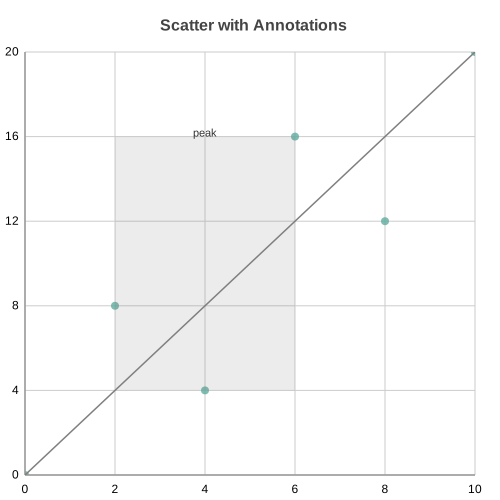
Each primitive accepts optional styling. BoxAnnotation takes color and
opacity; LineAnnotation takes color, width, and dashed;
LabelAnnotation takes color, font_size, and text_anchor. When a
color is omitted it falls back to the active theme.
API Reference
- class charted.charts.scatter.ScatterChart(*args, **kwargs)[source]
Bases:
ChartScatter plot for displaying relationships between two variables.
Plots individual data points at (x, y) coordinates to show correlations, clusters, or distributions. Supports multi-series data with custom marker shapes and sizes.
- Parameters:
data – Single series (list of y-values with x=indices) or multi-series (list of lists) or list of (x, y) tuples
x_data (Vector | Vector2D) – Optional x-coordinates for each point
labels – Optional series names
width (float) – Chart dimensions in pixels
height (float) – Chart dimensions in pixels
zero_index – Whether to include zero in both axes
title (str | None) – Optional chart title
theme (Theme | None) – Optional theme configuration
series_names (list[str] | None) – Names for each series (shown in legend)
series_styles (list[SeriesStyleConfig] | None) – Per-series style overrides (marker_shape, marker_size)
point_styles (list[list[PointStyleConfig | None]] | None) – Per-POINT marker overrides, a list of per-series rows mirroring the data shape. Each entry is a
PointStyleConfig(marker_shape,marker_size,fill,opacity) orNone. Any present field wins over the series-level/shape-cycle resolution; omitted fields fall through. Defaults to None, leaving every point styled by its series (existing behaviour). Data-label colour now comes from the theme’sdata_label_colortoken (override viaTheme(data_label_color=...)); the default token reproduces the previous axis-title colour.x_range (tuple[float, float] | None) – Optional (min, max) to fix the x-axis domain instead of deriving it from the data, removing the need for invisible anchor points to control the visible range.
y_range (tuple[float, float] | None) – Optional (min, max) to fix the y-axis domain.
domain_padding (float | None) – Optional fraction (e.g. 0.1) padding the data-derived domain by that amount on each side. Ignored on an axis with an explicit range. Defaults to None (no padding).
quadrant_label_inset (float) – Extra padding (px) used to inset the four quadrant labels from the plot corners so they clear the axis tick numbers instead of sitting flush. Defaults to 12.0; pass 0 to restore the original flush-corner placement.
quadrant_label_backplate (bool) – When True, draws a semi-opaque rounded background plate behind each quadrant label for contrast. Defaults to False.
shape_cycle (list[str] | bool | None) – Redundant shape encoding for multi-series scatters so series differ by marker SHAPE as well as colour. Defaults to None (every series uses circles, preserving existing behaviour). Pass True to enable the built-in cycle (circle, square, triangle, diamond, star), or a custom list of shape names to cycle through. A per-series
marker_shapeinseries_stylesalways wins over the cycle.legend (str) – Placement for a series legend that maps each
series_namesentry to its marker shape and colour swatch. One of'none'(default, no legend),'right','bottom', or'top'. When shown, layout space is reserved on that side so the legend never overlaps the plot. Requiresseries_names; with no names there is nothing to label and the layout is left unchanged.avoid_label_collisions (bool) – When True, run a collision-avoidance pass over the data labels so they overlap each other (and their markers) as little as possible, drawing a thin leader line back to a point whenever its label is pushed noticeably away. Defaults to False, which keeps the original fixed-offset label placement so existing renders are unchanged. See
_render_data_labelsfor the algorithm and its limitations.y_data (Vector | Vector2D)
subtitle (str | None)
subtitle_leading (float)
x_label (str | None)
y_label (str | None)
annotations (list[_Annotation] | None)
x_scale (object | None)
y_scale (object | None)
reference_lines (list[ReferenceLineDict] | None)
Example
>>> from charted import ScatterChart
>>> # Basic scatter plot
>>> chart = ScatterChart(data=[5, 8, 12, 15], x_data=[1, 2, 3, 4])
>>> chart.save('correlation.svg')
>>>
>>> # Multi-series with custom markers
>>> chart = ScatterChart(
...     data=[[5, 8, 12], [7, 10, 14]],
...     x_data=[1, 2, 3],
...     series_styles=[{'marker_shape': 'circle'}, {'marker_shape': 'square'}]
... )
Parameters:
data: List of [x, y] pairs, or list of lists for multi-seriesx_data: Alternative: explicit x values (optional)y_data: Alternative: explicit y values (optional)labels: Series names (shown in legend)width: Chart width in pixels (default 800)height: Chart height in pixels (default 600)theme: Theme name string or theme dictionarytitle: Chart title textsubtitle: Optional subtitle text
Example:
from charted import ScatterChart chart = ScatterChart( data=[[1, 2], [2, 4], [3, 5], [4, 4], [5, 7]], labels=["Product Sales"], title="Price vs Demand", theme="dark" # or "light", "high-contrast" ) chart.save("scatter.svg") print(chart.to_markdown()) # 
- DEFAULT_SHAPE_CYCLE = ['circle', 'square', 'triangle', 'diamond', 'star']
- property representation: G
Subclass must implement this.