Line Charts
Line chart with support for multi-series, negative values, and custom x-axis positions (XY mode). Perfect for trends over time or continuous data.
Basic Usage
Single series line:
from charted.charts import LineChart

chart = LineChart(
    data=[120, 180, 210, 150, 230],
    labels=["Jan", "Feb", "Mar", "Apr", "May"],
    title="Monthly Sales Trend"
)
chart.save("line.svg")
Multi-Series
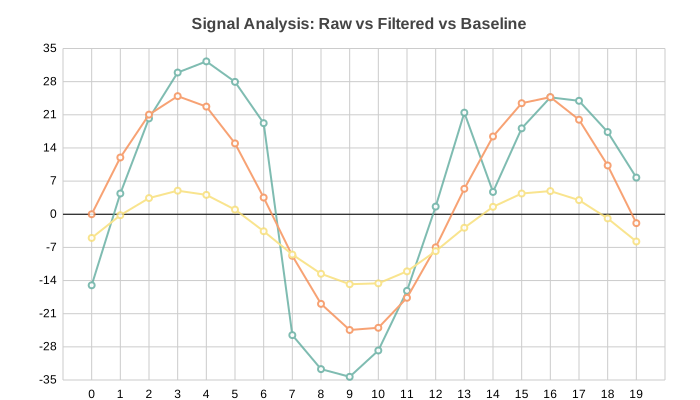
Multiple overlapping lines for comparison:
import math

n = 20
chart = LineChart(
    title="Signal Analysis: Raw vs Filtered vs Baseline",
    data=[
        [math.sin(i * 0.5) * 30 + (i % 7 - 3) * 5 for i in range(n)],  # Raw
        [math.sin(i * 0.5) * 25 for i in range(n)],                      # Filtered
        [math.sin(i * 0.5) * 10 - 5 for i in range(n)],                  # Baseline
    ],
    labels=[str(i) for i in range(n)],
    series_names=["Raw", "Filtered", "Baseline"],
    width=700,
    height=400,
)
XY Mode
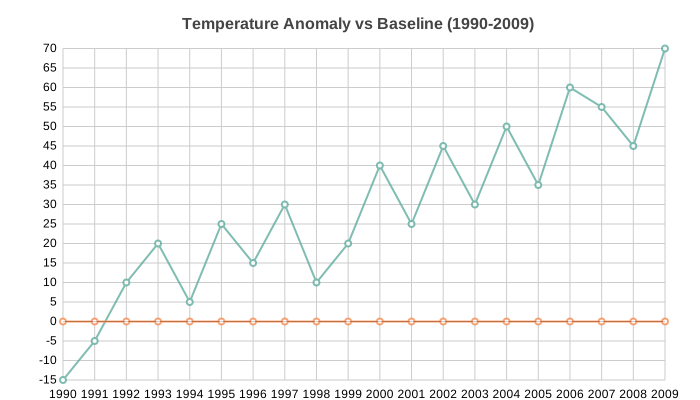
Use custom x-axis values instead of sequential indices:
years = list(range(1990, 2010))
anomalies = [-15, -5, 10, 20, 5, 25, 15, 30, 10, 20, 40, 25, 45, 30, 50, 35, 60, 55, 45, 70]

chart = LineChart(
    title="Temperature Anomaly vs Baseline (1990-2009)",
    data=[anomalies, [0] * len(years)],
    x_data=years,  # Custom x-axis values
    labels=[str(y) for y in years],
    series_names=["Anomaly", "Baseline"],
    width=700,
    height=400,
)
With Negative Values
Lines automatically handle negative values, crossing the zero baseline:
chart = LineChart(
    title="Monthly Profit/Loss ($K)",
    data=[
        [120, -45, 180, -30, 210, -60],   # 2023
        [150, -20, 200, -15, 180, -40],   # 2024
    ],
    labels=["Jan", "Feb", "Mar", "Apr", "May", "Jun"],
    series_names=["2023", "2024"],
    width=700,
    height=400,
)
Curve interpolation
By default lines connect points with straight segments (curve="linear").
Use the curve option to change how points are joined. Valid values are
"linear", "step", "basis", and "cardinal".
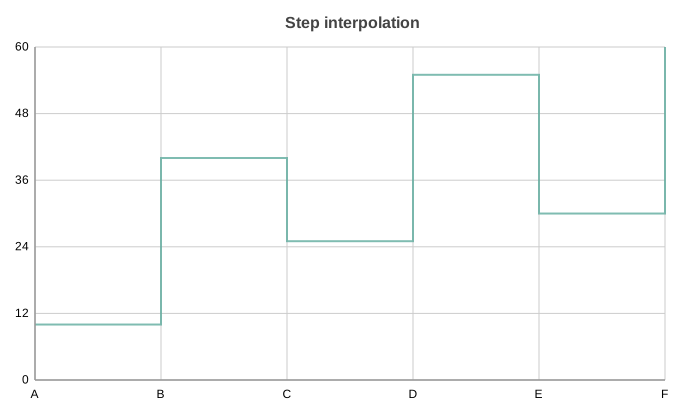
Step interpolation holds each value until the next point, drawing a staircase:
chart = LineChart(
    title="Step interpolation",
    data=[10, 40, 25, 55, 30, 60],
    labels=["A", "B", "C", "D", "E", "F"],
    curve="step",
)
chart.save("line_curve_step.svg")
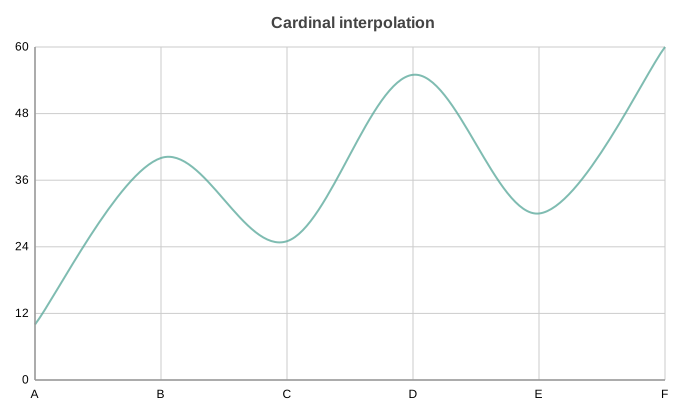
Cardinal interpolation draws a smooth spline through every point:
chart = LineChart(
    title="Cardinal interpolation",
    data=[10, 40, 25, 55, 30, 60],
    labels=["A", "B", "C", "D", "E", "F"],
    curve="cardinal",
)
chart.save("line_curve_cardinal.svg")
Log Scale
Use y_scale="log" when the data spans several orders of magnitude. Tick labels fall on powers of ten and all values must be positive:
chart = LineChart(
    title="Requests per Second (log scale)",
    data=[12, 140, 1300, 9800, 75000],
    labels=["v1", "v2", "v3", "v4", "v5"],
    y_scale="log",
)
chart.save("line_log_y.svg")
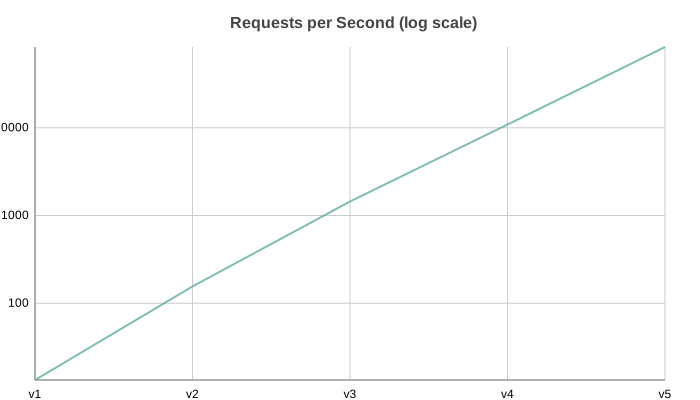
The same option works on the x-axis via x_scale="log".
Time Axis
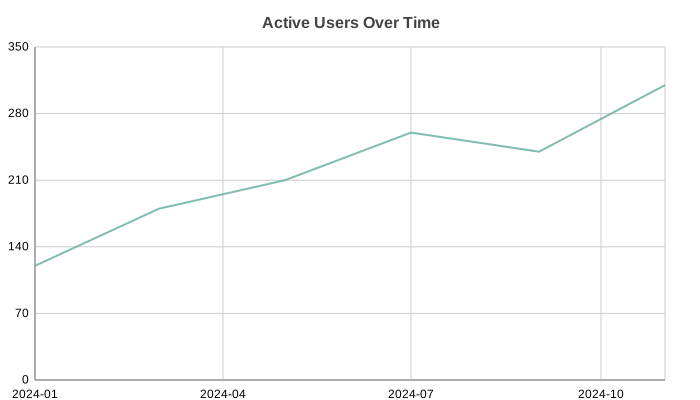
Pass date or datetime values as x_data together with x_scale="time" to get a date-aware axis with formatted tick labels. ISO date strings are accepted too:
from datetime import date

chart = LineChart(
    title="Active Users Over Time",
    data=[120, 180, 210, 260, 240, 310],
    x_data=[
        date(2024, 1, 1),
        date(2024, 3, 1),
        date(2024, 5, 1),
        date(2024, 7, 1),
        date(2024, 9, 1),
        date(2024, 11, 1),
    ],
    x_scale="time",
)
chart.save("line_time_x.svg")
Configuration Options
Line styling:
Line styling:
# Custom line width and markers via series_style
chart = LineChart(
    data=[120, 180, 210],
    labels=["Q1", "Q2", "Q3"],
    series_style={
        "stroke_width": 3.0,
        "marker_shape": "square",
        "marker_size": 6.0
    }
)
Custom colors:
chart = LineChart(
    data=[[120, 180], [80, 95]],
    labels=["Q1", "Q2"],
    series_names=["Revenue", "Expenses"],
    theme={
        "colors": {
            "palette": ["#2ECC71", "#E74C3C"]
        }
    }
)
API Reference
- class charted.charts.line.LineChart(*args, **kwargs)[source]
Bases:
ChartLine chart for displaying trends over continuous data.
Connects data points with straight lines to show changes across categories or time. Supports multi-series data with optional area fills, markers, and custom styling.
- Parameters:
data (Vector | Vector2D) – Single series (list of values) or multi-series (list of lists)
x_data (Vector | Vector2D | None) – Optional x-axis values (defaults to indices 0, 1, 2, …)
labels (Labels | None) – Optional x-axis labels
width (float) – Chart dimensions in pixels
height (float) – Chart dimensions in pixels
zero_index (bool) – Whether to include zero in the data range
title (str | None) – Optional chart title
theme (Theme | None) – Optional theme configuration
series_names (list[str] | None) – Names for each series (shown in legend)
series_styles (list[SeriesStyleConfig] | None) – Per-series style overrides (stroke, marker_shape, etc.)
subtitle (str | None)
subtitle_leading (float)
markers (bool)
x_label (str | None)
y_label (str | None)
annotations (list[_Annotation] | None)
curve (str)
x_scale (object | None)
y_scale (object | None)
reference_lines (list[ReferenceLineDict] | None)
legend (str)
Example
>>> from charted import LineChart
>>> # Basic line chart
>>> chart = LineChart(
...     data=[10, 25, 18, 32],
...     labels=['Jan', 'Feb', 'Mar', 'Apr']
... )
>>> chart.save('trends.svg')
>>>
>>> # Multi-series with area fill
>>> chart = LineChart(
...     data=[[10, 25, 18], [15, 20, 28]],
...     labels=['2023', '2024'],
...     series_styles=[{'area_fill': True, 'area_fill_opacity': 0.2}]
... )
Parameters:
data: Single list for one series, or list of lists for multi-serieslabels: X-axis labels (or usex_datafor XY mode)x_data: Custom x-axis values for XY mode (optional)series_names: Names for each data series (shown in legend)width: Chart width in pixels (default 800)height: Chart height in pixels (default 600)theme: Theme name string or theme dictionarytitle: Chart title textsubtitle: Optional subtitle text
Example:
from charted import LineChart chart = LineChart( data=[[120, 180, 210], [80, 95, 110]], labels=["Q1", "Q2", "Q3"], series_names=["Revenue", "Expenses"], title="Trend Analysis", theme="dark" # or "light", "high-contrast" ) chart.save("line.svg") print(chart.to_markdown()) # 
- DEFAULT_DASH_CYCLE = ['none', '6,4', '2,3', '8,3,2,3', '1,3']
- property representation: G
Generate line chart SVG elements using LineRenderer.