Pie Charts
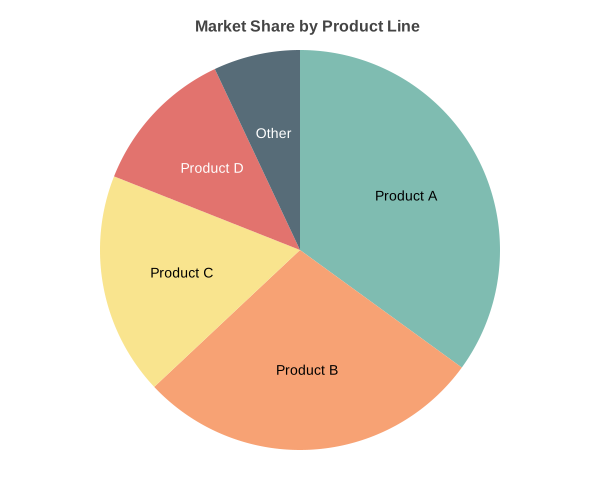
Circular chart displaying categorical data as proportional slices. Supports doughnut mode, per-slice styling, and exploded slices.
Basic Usage
Simple pie chart:
from charted.charts import PieChart

chart = PieChart(
    data=[45, 30, 15, 10],
    labels=["Electronics", "Clothing", "Food", "Other"],
    title="Revenue by Category"
)
chart.save("pie.svg")
Doughnut Mode
Create a doughnut chart by setting inner_radius:
chart = PieChart(
    title="Sales Distribution",
    data=[45, 30, 15, 10],
    labels=["Electronics", "Clothing", "Food", "Other"],
    width=500,
    height=400,
    inner_radius=0.5  # 50% of outer radius
)
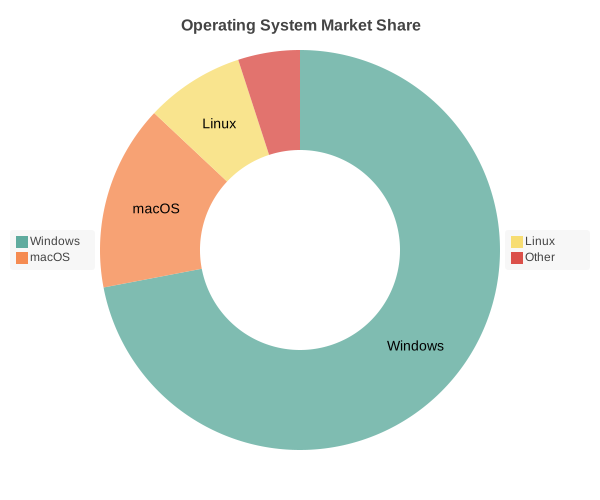
Customizing Doughnut:
chart = PieChart(
    data=[300, 150, 100],
    labels=["Product A", "Product B", "Product C"],
     inner_radius=0.4,  # Smaller hole
    start_angle=45,  # Rotate chart
    theme={
        "colors": ["#FF6B6B", "#4ECDC4", "#45B7D1"]  # Custom slice colors
    }
)
Exploded Slices
Highlight specific slices by exploding them outward:
# Explode all slices uniformly
chart = PieChart(
    data=[45, 30, 15, 10],
    labels=["A", "B", "C", "D"],
    explode=0.1  # Explode all by 10%
)

# Explode specific slices
chart = PieChart(
    data=[45, 30, 15, 10],
    labels=["A", "B", "C", "D"],
    explode=[0.15, 0.0, 0.1, 0.0]  # Per-slice explosion
)
Per-Slice Styling
Customize individual slices with colors, labels, and explosion:
chart = PieChart(
    data=[300, 150, 100, 50],
    labels=["Product A", "Product B", "Product C", "Product D"],
    title="Market Share",
    slice_styles={
        0: {
            "color": "#FF6B6B",
            "explode": 0.1,
            "label_position": "outside"
        },
        1: {
            "color": "#4ECDC4",
            "label_position": "inside"
        },
        2: {
            "color": "#45B7D1",
            "label_position": "auto"
        },
        3: {
            "color": "#FFA07A",
            "label_position": "outside"
        }
    }
)
Custom Colors
Override the default color palette:
chart = PieChart(
    data=[300, 150, 100],
    labels=["A", "B", "C"],
    theme={
        "colors": ["#2ECC71", "#3498DB", "#E74C3C"]
    }
)
Or use a built-in theme:
chart = PieChart(
    data=[300, 150, 100],
    labels=["A", "B", "C"],
    theme="dark"  # Dark background theme
)

chart = PieChart(
    data=[300, 150, 100],
    labels=["A", "B", "C"],
    theme="light"  # Light background theme
)
Rotation and Angle
Control the starting angle of the pie:
# Start from top (default)
chart = PieChart(
    data=[45, 30, 15, 10],
    labels=["A", "B", "C", "D"]
)

# Start from right (90 degrees)
chart = PieChart(
    data=[45, 30, 15, 10],
    labels=["A", "B", "C", "D"],
    start_angle=90
)
Label Positioning
Control where labels appear:
# Labels positioned automatically based on slice size
chart = PieChart(
    data=[300, 150, 100],
    labels=["Large", "Medium", "Small"]
)

# Labels positioned automatically based on slice size
chart = PieChart(
    data=[300, 150, 100],
    labels=["Large", "Medium", "Small"]
)
Configuration Options
Complete pie customization:
chart = PieChart(
    data=[300, 150, 100, 50],
    labels=["Product A", "Product B", "Product C", "Product D"],
    title="Revenue Distribution",
    width=600,
    height=500,
    inner_radius=0.4,          # 0 for pie, 0.3-0.7 for doughnut
    start_angle=0,             # Starting angle in degrees
    explode=0,                 # Default explode amount
    theme={
        "colors": ["#FF6B6B", "#4ECDC4", "#45B7D1", "#FFA07A"]
    }
)
API Reference
- class charted.charts.pie.PieChart(*args, **kwargs)[source]
Bases:
ChartPie chart for displaying categorical data as proportional slices.
Renders data as a circular chart divided into slices where each slice’s arc length (and area) is proportional to its value. Supports doughnut mode, slice explosion, and custom labeling.
- Parameters:
data (Vector) – Values for each slice (must be non-negative, sum > 0)
labels (Labels | None) – Optional labels for each slice
width (float) – Chart dimensions in pixels (default 700x500 for better legend layout)
height (float) – Chart dimensions in pixels (default 700x500 for better legend layout)
title (str | None) – Optional chart title
theme (Theme | None) – Optional theme configuration
inner_radius (float) – Ratio (0.0-1.0) for doughnut hole; 0 = regular pie
explode (float | Vector) – Single value or list to offset slices from center (pixels)
start_angle (float) – Starting angle in degrees (0 = top, clockwise)
series_styles (list[SeriesStyleConfig] | None) – Optional per-slice styling overrides
show_percentages (bool) – If True, show percentage values on each slice
legend (str)
Example
>>> from charted import PieChart
>>> # Basic pie chart
>>> chart = PieChart(
...     data=[25, 35, 40],
...     labels=['Product A', 'Product B', 'Product C']
... )
>>> chart.save('market_share.svg')
Parameters:
data: Single list of values (one slice per value)labels: Slice labelsinner_radius: Inner radius ratio for doughnut mode (0.3-0.7, default: 0; 0 = regular pie)slice_styles: Dictionary mapping slice index to style overridesheight: Chart height in pixels (default 600)theme: Theme name string or theme dictionarytitle: Chart title textsubtitle: Optional subtitle text
Slice Style Options:
color: Override slice colorexplode: Explode distance (0-1 ratio)label_position: “inside”, “outside”, or “auto”
Example:
from charted import PieChart chart = PieChart( data=[300, 150, 100, 50], labels=["Product A", "Product B", "Product C", "Product D"], title="Market Share", inner_radius=0.5, slice_styles={ 0: {"color": "#FF6B6B", "explode": 0.1}, 1: {"color": "#4ECDC4"}, 2: {"color": "#45B7D1"}, 3: {"color": "#FFA07A"} } ) chart.save("pie.svg") print(chart.to_markdown()) # 
- render_axes = False
- __init__(data, labels=None, width=700, height=500, title=None, theme=None, inner_radius=0, explode=0, start_angle=0, series_styles=None, show_percentages=False, value_labels=None, legend='none', category_patterns=None)[source]
Initialize pie chart.
- Parameters:
data (list[float]) – Values for each slice (must be non-negative, sum > 0)
width (float) – Chart dimensions in pixels (default 700x500)
height (float) – Chart dimensions in pixels (default 700x500)
title (str | None) – Optional chart title
theme (Theme | None) – Optional theme configuration
inner_radius (float) – Ratio (0.0-1.0) for doughnut hole; 0 = regular pie
explode (float | list[float]) – Single value or list to offset slices from center (pixels)
start_angle (float) – Starting angle in degrees (0 = top, clockwise)
series_styles (list[SeriesStyleConfig] | None) – Optional per-slice styling overrides
show_percentages (bool) – If True, show percentage values on each slice
legend (str)
- property colors: list[str]
Get generated color palette (read-only).
Colors are generated from data length in __init__ and cannot be modified. Use series_styles for per-slice color overrides.
- property representation: G
Render the pie chart.