Combo Charts
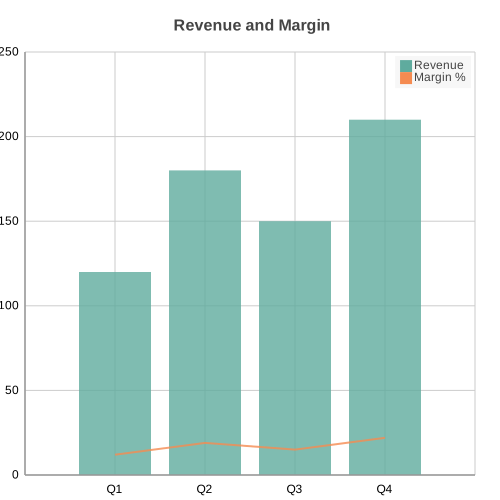
Combo chart mixing bar/column and line/area series on shared axes. Useful when two related metrics live on different scales, such as revenue alongside a margin percentage.
Basic Usage
One bar series and one line series on a shared x-axis:
from charted.charts import ComboChart

chart = ComboChart(
    series=[
        {"data": [120, 180, 150, 210], "type": "bar", "name": "Revenue"},
        {"data": [12, 19, 15, 22], "type": "line", "name": "Margin %"},
    ],
    labels=["Q1", "Q2", "Q3", "Q4"],
    title="Revenue and Margin",
)
chart.save("combo.svg")
Each entry in series is a dict with data (the y-values), type (one of "bar", "column", "line", "area"), an optional name for the legend, and an optional axis. A ComboChart needs at least two series.
Secondary Axis
Assign a series to the secondary y-axis with "axis": "secondary". That series scales to its own range and its tick labels render on the right edge, so a small percentage can sit next to large counts without being flattened:
chart = ComboChart(
    series=[
        {"data": [120, 180, 150], "type": "bar", "name": "Units"},
        {
            "data": [2.5, 3.1, 2.8],
            "type": "line",
            "name": "Conversion %",
            "axis": "secondary",
        },
    ],
    labels=["Jan", "Feb", "Mar"],
    title="Units vs Conversion",
)
chart.save("combo_secondary.svg")
API Reference
- class charted.charts.combo.ComboChart(*args, **kwargs)[source]
Bases:
ChartMixed bar/line chart on shared axes with optional secondary y-axis.
- Parameters:
series (list[ComboSeriesDict]) – List of series dicts. Each dict has: -
data: list of y-values -type: one of “bar”, “column”, “line”, “area” -axis(optional): “primary” (default) or “secondary” -name(optional): legend labellabels (Labels | None) – Category labels for the shared x-axis.
width (float) – Chart dimensions in pixels.
height (float) – Chart dimensions in pixels.
title (str | None) – Optional chart title.
theme (Theme | None) – Optional theme configuration.
x_label (str | None) – Optional axis titles.
y_label (str | None) – Optional axis titles.
zero_index (bool)
column_gap (float)
series_styles (list[SeriesStyleConfig] | None)
legend (str)
Example
>>> chart = ComboChart(
...     series=[
...         {"data": [10, 20, 30], "type": "bar", "name": "Revenue"},
...         {"data": [3, 6, 9], "type": "line", "name": "Margin"},
...     ],
...     labels=["Q1", "Q2", "Q3"],
... )
Parameters:
series: List of series dicts, each withdata,type, optionalnameand optionalaxislabels: Category labels for the shared x-axiswidth: Chart width in pixels (default 800)height: Chart height in pixels (default 600)title: Chart title texttheme: Theme name string or theme dictionaryx_label,y_label: Optional axis titlescolumn_gap: Gap between side-by-side columns (default 0.2)
Example:
from charted import ComboChart

chart = ComboChart(
    series=[
        {"data": [10, 20, 30], "type": "bar", "name": "Revenue"},
        {"data": [3, 6, 9], "type": "line", "name": "Margin"},
    ],
    labels=["Q1", "Q2", "Q3"],
    title="Revenue and Margin",
    theme="dark",  # or "light", "high-contrast"
)
chart.save("combo.svg")
- property secondary_y_axis: YAxis | None
Secondary y-axis, built lazily from secondary series only.
Built on first access (which happens during the base __init__ when it computes
representation) so the axis can use the resolved plot dimensions and theme.
- property representation: G
Subclass must implement this.
- describe()[source]
Return a structured dictionary of chart metadata.
Useful for AI agents that need to reason about a chart they just created. Contains chart type, dimensions, series statistics, labels, and layout flags.
- Returns:
chart_type, title, dimensions, series, labels, label_count, series_count, theme, has_negative_values, stacked.
- Return type:
Dict with keys